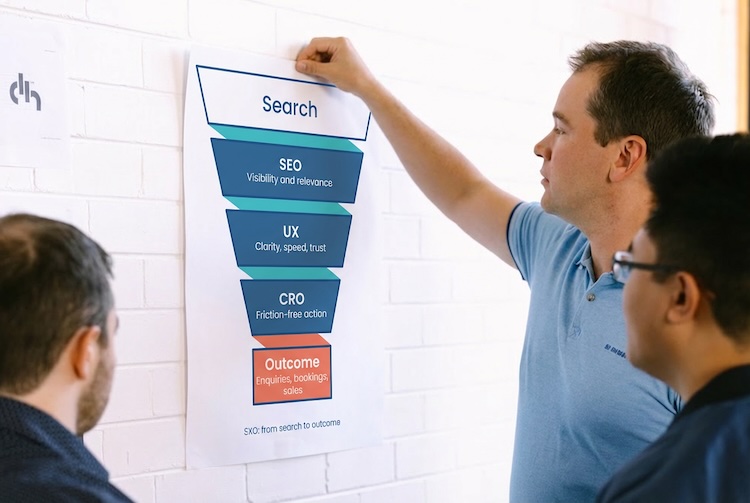

Most content fails for one simple reason: it does not give the searcher what they came for, fast enough. SEO content writing is not about clever phrasing or padding a page with keywords. It is about four core principles that determine whether your content ranks or gets ignored:
- Search intent speed
- Content relevance
- Content depth
- Strategic keyword placement
If you nail these pillars and structure your pages correctly, you will outperform bigger competitors even with lower domain authority. This guide shows you exactly how to write content for SEO in simple, clear steps (with a bonus trade secret if you make it to the end).
Quick summary
- SEO content must satisfy search intent fast
- The primary keyword must be placed in the H1, intro, and used naturally throughout
- Depth means completeness, not word count
- Relevance means staying tightly on topic
- Service pages should follow a basic page hierarchy
- Internal linking should be strategic and consistent
- Use the internal linking PDF method to get a real advantage
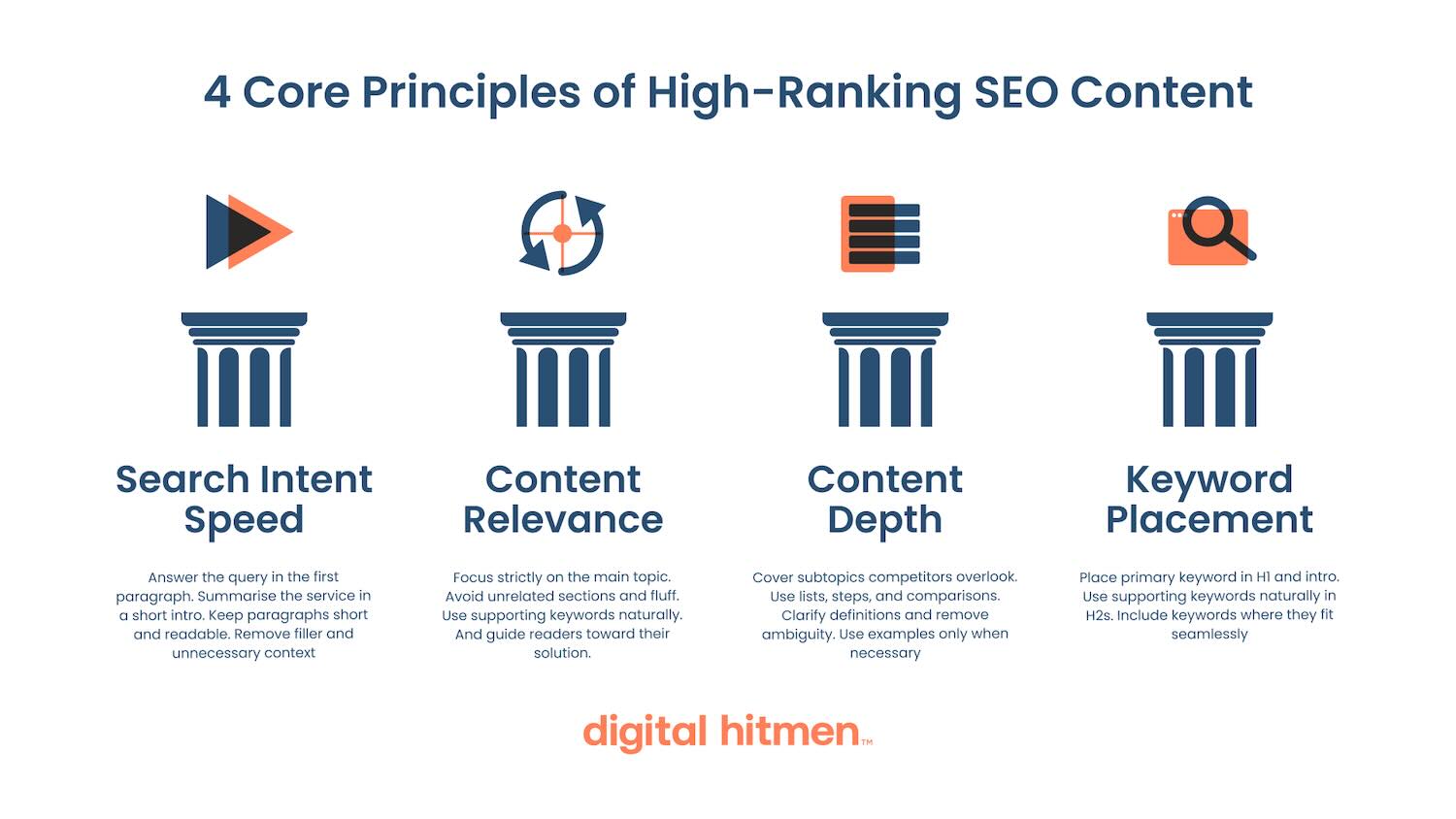
Our four core principles of high ranking SEO content
Want to drive serious traffic to your website and convert it into business?
1. Search intent speed
Search intent speed refers to how quickly you give users what they came for. Google measures this through engagement and satisfaction signals. Your goal is to answer the question or summarise the service immediately.
Search intent speed improves ranking when you:
- Answer the query in the first paragraph
- Summarise the service in one short intro
- Keep paragraphs short and readable
- Remove filler, lengthy stories, and unnecessary context
Poor content hides the answer halfway down the page. Strong SEO content delivers it instantly.
2. Content relevance
Relevance means staying laser focused on the query. Google demotes pages that drift off topic or add fluff.
A relevant page:
- Focuses strictly on the primary topic
- Avoids unrelated sections
- Uses supporting keywords only when naturally aligned
- Guides the reader toward the solution they came for
3. Content depth
Depth means completeness, not length. A deep page answers every reasonable question a user might have.
You create depth by:
- Covering subtopics competitors overlook
- Using lists, steps, and comparisons
- Clarifying definitions
- Removing ambiguity
- Using examples only when necessary
Depth signals expertise and improves your chance of earning snippets and AI Overview placements.
4. Keyword placement
The primary keyword must appear in high value locations, but it’s more about quality than quality. As a rule of thumb, an exact-match version of your keyword (although, outside of the H1, a preposition like “in” should be added to keep it natural, e.g. dentist in Perth) should appear in the:
- H1
- First paragraph
- H2s (at least once)
- Body text (only where natural)
- Alt text (once, in the most relevant image)
- Schema (where relevant)
Supporting keywords should appear in H2s and H3s only if they fit naturally.
How do you find keywords to target?
You can do a basic version of this for free using the Google Ads Keyword Planner. To use this, simply:
- Open Google Ads → Tools & Settings → Keyword Planner.
- Click Discover new keywords.
- Enter a few seed keywords or a website URL and set country/location + language.
- Click Get results to see keyword ideas.
- Sort/filter by avg. monthly searches, competition, and bid range to find good terms.
- Tick the best keywords and add them to your plan or download/export them.
However, if you have access to platforms like Semrush or Ahrefs, you can:
- Open Semrush or Ahrefs and go to the Keyword Research / Keyword Explorer tool.
- Enter a seed keyword or competitor URL and select your target country/location.
- Run the search to see metrics like volume and keyword difficulty.
- Use filters (include/exclude words, volume range, KD range, intent) to narrow to relevant terms.
- Open the “Related,” “Questions,” or “Phrase match” lists to expand long-tail opportunities.
- Save strong keywords to a list/project or export them to CSV for mapping into pages/campaigns.
The results of our approach
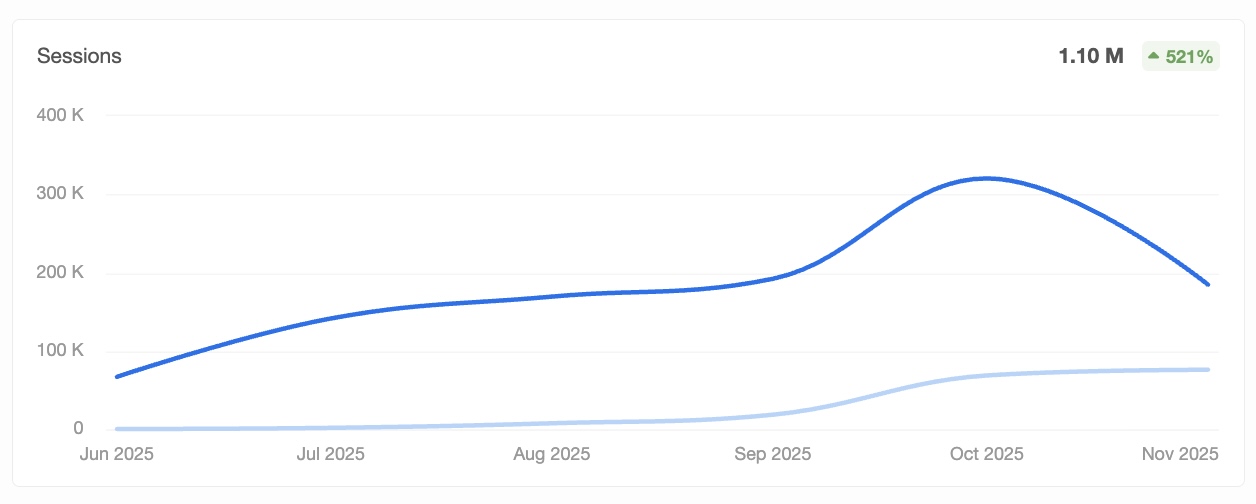
Here’s what happened when we applied these exact principles to Discovery Alert, one of our award-winning campaigns.
This client grew from 623 monthly organic sessions to more than 142,000, fuelled purely by SEO content. No paid ads. No backlinks. No wizardry. Just smart strategy and well structured writing.
Now, let’s be clear; this level of growth is VERY much an outlier. If you’re a plumber in Perth, you are probably not about to pull 140k sessions a month. But results like this do prove one thing: we know what we’re doing, and the same principles that delivered this monster outcome absolutely apply to every business, in every industry.
If you want to understand the deceptively-simple framework behind results like these, keep reading.
How to use heading tags
Before we begin, it’s important to know how to use heading tags properly.
Below is a lightning-fast rundown that tells you everything you need to know to get the ball rolling:
- H1: Used only once (for the main title of the page)
- H2: For major sections or subtopics
- H3: For further breakdowns or supporting details under H2 sections.
- H4 and beyond: Used for minor subheadings or details within H3 sections (use sparingly).
How to write blog posts for SEO
Blogs are designed to build authority while capturing informational intent. If you stick to this basic structure, you’ll have done 90% of your job.
1. H1 with primary keyword
The H1 sets the topic for the entire article and signals to Google what the page is about. It should be clear, direct, and include the primary keyword exactly once. Avoid clever phrasing or over-complicating the headline. The goal is clarity and relevance, not creativity.
- Use one H1 only
- Include the primary keyword naturally
- Keep it short and easy to understand
A strong H1 ensures both users and search engines instantly recognise the topic.
2. Direct answer intro
Your intro must answer the core question immediately. If the blog topic is, “Different types of plugs,” don’t go on a rant about how it’s weird that we all use plugs every day but we don’t know what they’re called; just list the bloody plugs! This is the most important part of a blog because it satisfies search intent within seconds, which improves dwell time and increases the likelihood of ranking.
Include:
- One short paragraph that gives the reader a direct answer
- A natural use of the primary keyword
- Zero fluff, filler, or storytelling
A fast, clear intro helps search engines identify the relevance of your content and increases the chance of appearing in featured snippets and AI-generated summaries.
3. Quick summary
This section improves scannability and ensures readers who skim still get immediate value. It is also highly compatible with AI Overviews and featured snippet extraction.
- Add an H2 titled “Quick summary”
- Use bullet points to summarise the most important takeaways
- Keep each bullet point short and high value
This section sets the tone for the rest of the article and makes your content more digestible.
4. Value-first section order
The highest value sections must appear near the top of the blog. This helps with user engagement and reduces bounce rates, which in turn supports stronger SEO performance.
Examples:
- Key steps or instructions
- Common mistakes and how to avoid them
- What to do first
- Best practices that deliver immediate wins
Avoid arranging content based on narrative flow or creativity unless it helps the reader. Prioritise usefulness and clarity above everything.
5. Supporting keyword placement in H2s
Supporting keywords help reinforce topical authority, but they must be placed where they fit naturally. Only include them when they enhance clarity or help categorise the content.
- Use supporting keywords in H2s when they genuinely align with the section
- Avoid awkward or forced phrasing
- Never stuff keywords for the sake of SEO
The goal is to help search engines understand your topical coverage without compromising readability.
6. Depth without filler
Depth is about completeness, not length. Your blog should provide all the information a reader is realistically looking for without unnecessary padding.
Use:
- Bullet points for clarity
- Numbered lists for processes or steps
- Comparisons to explain differences or choices
- Definitions to improve understanding
- Real examples only when they add value
- Short paragraphs that maintain flow
The aim is to make your content the best version of the topic online, while staying concise and on topic.
7. Internal linking
Internal linking improves navigation, strengthens topic clusters, and helps pass authority to priority pages. Links must always be relevant and placed where they naturally support the reader.
Internal links must:
- Be placed naturally within context
- Use naturalised anchor text rather than exact-match slugs
- Guide users to helpful related content
- Strengthen SEO by building clear internal pathways
Example anchor text conversions:
- slug: seo-perth → anchor: SEO in Perth
- slug: aircon-regas-perth → anchor: aircon regas in Perth
This helps search engines and users understand how your content connects across the site.
8. FAQs section
FAQs help you capture long tail keywords, reduce reader uncertainty, and keep users on the page longer. They work best when written in a natural, conversational style, phrased the same way a real person would ask the question. Think of how you would type the question into ChatGPT (then convert it into proper English).
A strong FAQ section should:
- Use an H2 titled “FAQs” or a natural variant
- Phrase each question as a genuine, conversational query
- Use an H3 for each question
- Give short, direct answers with no filler
- Cover only questions the reader would realistically ask
Good FAQ topics include:
- “Do I really need…?”
- “What’s the difference between…?”
- “How long does this take?”
- “What does this cost?”
- “Can I do this myself, or do I need a professional?”
Keep each answer clear, factual, and focused on helping the reader quickly get the information they came for. Avoid duplicating large chunks of content from the article and only include questions that add genuine value.
9. Closing CTA
Every blog should end with a clear next step. The CTA should be directly related to the blog topic and invite the reader to continue their journey.
- Make the CTA specific and relevant
- Keep it short and action focused
- Ensure it links to the most relevant service
A strong CTA turns information into action and supports the overall conversion strategy of your site.
How to write service page content
Below is a very basic guide for how to build your page content around our 4 key principles, but it doesn’t need to be much more fancy than this; you can get great results with just the below sections.
1. Hero section
The hero must deliver the core message instantly and reassure the user they are in the right place. Most visitors decide within seconds whether to stay or leave, so this section needs to communicate the offer, the location, and the value clearly.
Include:
- H1 with the primary keyword
- One short intro paragraph summarising the service or product, who it is for, and the outcome of using it
- CTA button that scrolls to the contact form
- Optional trust signals such as awards, years in business, local expertise, or a short proof point
The goal is to satisfy search intent immediately and remove any uncertainty about what you offer.
2. Services or pricing section
This is the section that builds clarity around what you actually deliver and how much it costs. It also helps target secondary keywords and improves conversions by giving users specific options to choose from.
Include:
- H2 targeting a relevant supporting keyword
- H3s for each service, product, or package
- Short, descriptive service explanations written for speed and clarity
- Pricing with ranges if exact figures vary, or clear starting prices where relevant
- CTA encouraging users to enquire about the most suitable option
If you can logically combine services and pricing into a single section, do it. If not, prioritise pricing first because it reduces friction and answers a high intent question early.
3. Why choose us?
This section establishes trust and positions your business as the safest and most capable option, and allows you to incorporate EEAT signals naturally while still remaining on topic.
Include:
- H2 using a relevant keyword or customer-focused phrase
- Four to five sentences covering your experience, qualifications, awards, specialisation, and what sets you apart
- CTA button encouraging visitors to move to the enquiry form
Keep this tight, factual, and benefit focused. This is not the place for storytelling or fluff.
Note: Don’t use the exact same “Why choose us?” text for every page; improve relevance by taking the key selling points for your business and applying them to the unique context of your page.
4. Reviews
Real reviews act as a psychological proof point that reduces decision friction and increases conversions.
Include:
- H2
- Real client reviews (screenshots, Google embeds, or high quality testimonials)
- Optional short intro line framing the volume or quality of your reviews
This section reinforces trust and encourages visitors to continue scrolling toward your CTA.
5. Additional helpful content
This section supports the user in making a confident decision by filling gaps the previous sections do not cover. Only include content that directly improves clarity, reduces uncertainty, or supports conversions.
Examples:
- Process steps that explain how the service works from start to finish
- Before and after results or examples of your work
- Comparison tables outlining service tiers or options
- Guarantees or assurances
- Relevant blog links that support topical authority
Keep the content structured, concise, and placed only where it adds genuine value.
6. FAQs
This is where you target long tail keywords and answer all the questions that would otherwise clutter the main content sections.
Include:
- H2 for the FAQ heading
- H3s for each question heading
- Clear, concise answers with no filler
Aim for five to twelve FAQs depending on the service complexity. Prioritise questions users actually search or ask verbally. Consider pulling prompts from Google’s “People Also Ask” and your internal analytics.
7. Contact section
This is the main conversion point and should be the final section on the page.
Include:
- Contact form or booking CTA
- Short reassurance line (for example, no obligation, quick reply, or direct access to an expert)
- Optional phone number or alternative contact option
All CTA buttons throughout the page should scroll directly to this section to create a seamless conversion path.
Note: Do not link to a contact us page; all this does is waste your link juice.
How to write alt text for SEO
Alt text should describe the image clearly and naturally so search engines and screen readers understand what it represents. It is not a place to cram keywords or repeat the file name. The goal is simple: explain what the image shows and why it matters on the page.
A strong alt text should:
- Describe the image accurately in one short sentence
- Include the primary keyword only if it fits naturally
- Reflect the purpose of the image, not just the visual details
- Avoid filler phrases such as “image of” or “picture of”
Good alt text helps:
- Improve accessibility
- Reinforce topical relevance
- Support image search
- Strengthen on-page SEO without looking forced (more on this in our on-page SEO guide)
Examples:
- Technician performing aircon regas on a Toyota Hilux in Perth workshop
- SEO specialist reviewing keyword data during campaign planning
- Before and after comparison of polished concrete floor finish
The key is clarity. If a human can understand exactly what the image shows by reading the alt text alone, you have written it correctly.
How to write SEO titles
Your SEO title must be clear, keyword-focused, and compelling enough to earn the click. The structure is simple:
[Exact Match Keyword] | [Hook]
This format ensures search engines understand the topic immediately while giving users a reason to choose your result over competitors.
When writing SEO titles:
- Use the primary keyword exactly as people search it
- Keep the title readable and natural
- Add a short hook that communicates value, clarity, speed, relevance (or, for blogs, just some strong clickbait)
- Avoid vague promises or weak clickbait
- Keep it within 50–60 characters where possible to prevent truncation
Examples:
- Service page: Emergency Plumbing Perth | Expert Plumbers, 24/7 Reception
- Blog: SEO Content Writing Guide for Beginners [All You Need to Know]
The goal is clarity first, persuasion second.
How to write meta descriptions
A meta description should spoil the content. Tell the reader exactly what they will learn before they even click. This increases relevance, improves user satisfaction, and boosts click-through rate.
A strong meta description should:
- Provide the answer or core insight immediately
- Include the primary keyword once, naturally
- Summarise the value of the page in one or two concise sentences
- Encourage the reader to click for deeper detail
- Stay within 130–150 characters
Meta descriptions are not the place for fluff or teasers. They are a chance to prove upfront that your page is the best match for the query.
Example: Strong SEO content is built on search intent speed, relevance, depth, and smart keyword placement. Learn everything you need to know here!
The goal is to satisfy search intent as quickly as possible, then invite users to read more.
Contrary to popular belief, meta descriptions are not a ranking factor, so don’t worry about shoehorning in your keywords.
How to optimise content for AI Overviews and generative engines
All of the above will help you optimise for AI Overviews and generative search (good SEO is good AI SEO/GEO), but to reiterate:
- Answer the query immediately
- Keep structure clean and predictable
- Use short paragraphs
- Use bullet points wherever possible
- Maintain strict topical focus
- Strengthen EEAT using awards, years of experience, and process insights
- Write FAQ headings in a conversational tone that matches how people ask LLMs
Generative engines prefer clarity and structure, not creativity or filler.
General writing tips
Good writing is part of good SEO. Below are some general writing tips that will ensure your SEO efforts aren’t held back by simple mistakes:
- Break up long paragraphs for readability (helps users digest information and stay engaged)
- Use short, direct sentences (reduces cognitive load and keeps momentum)
- Avoid filler or rambling (keeps content tight and purposeful)
- Write in plain, everyday English (ensures all readers understand you quickly)
- Put the most important information early (matches how people scan content)
- Use bullet points for lists or multiple ideas (improves structure and skimmability)
- Prefer active voice over passive voice (creates clearer, stronger statements)
- Use transitions between ideas (improves flow and prevents abrupt jumps)
- Remove duplicate or unnecessary wording (keeps the reader moving forward)
- Read tricky sections aloud (helps identify awkward phrasing or complexity)
- Keep formatting consistent across headings, spacing, and tone (makes the page feel polished and professional)
Bonus tip: the internal linking secret that beats other content writers
This method, which I’ll awkwardly dub the “DHIL Hack” (Digital Hitmen Internal Linking), gives you a clear competitive advantage because no other agencies or freelancers are doing it (that we know of, we obviously can’t know them all).
1. Collect your internal link targets
Gather URLs for:
- Key service pages
- Blog posts
- High converting landing pages
- Category hubs
- Tools
- Any page that assists conversion or builds topical authority
This process is made super simple by just taking them from your sitemap.
2. Add them to a Google Doc
Title the document:
Internal Linking Opportunities – [Client Name]
3. Export the document as a PDF
Keep it clean and well formatted.
4. Upload the PDF to your LLM
This is the key step.
Provide the instruction:
“Where relevant and natural, use the internal links in the uploaded PDF. Use naturalised versions of slug keywords as anchor text.”
This ensures:
- Consistent internal linking
- Perfect topic clustering
- No missed linking opportunities
- Improved SERP performance
- Faster content production
- Stronger page authority flow
This method alone can transform the quality and SEO impact of your content.
Additional bonus tip: get an SEO content writer to do it

Great SEO content is simple. Answer the question fast, stay on topic, structure your sections logically, and use keywords where they matter most. Prioritise depth without filler, place internal links naturally, and write FAQs in a conversational way that mirrors how real people search. When you follow this framework, your content becomes clearer, more helpful, and far more likely to rank.
However, if you want support implementing this across your website, get in touch with our SEO experts in Perth and see how we build content that consistently outperforms competitors. Let’s talk.
FAQs
How do I know if my content satisfies search intent fast enough?
Your intro should answer the main question in one or two sentences. If a user can skim the first paragraph and immediately understand the solution, you’ve met search intent. If you need multiple paragraphs before getting to the point, you’ve missed it.
How long should an SEO blog actually be?
There’s no fixed word count. The blog should be as long as needed to fully answer the question and cover key subtopics without filler. Some topics take 800 words, others take 2,000. Depth and relevance matters, not length.
How do I choose which internal links to use in a blog?
Link to pages that strengthen topical relevance or help the reader take the next step. Use naturalised anchor text, not exact-match slugs, and ensure the link genuinely fits the sentence.
Should every blog include FAQs, or only some of them?
Use FAQs when the topic naturally creates follow-up questions or when long tail variations need coverage. If your article already answers everything clearly, keep the FAQ section minimal or skip it entirely.